
Compare PageSpeed Insights vs Lighthouse in 2026.
Learn which PageSpeed test matters for SEO and Core Web Vitals.
Updated 14th March 2026
See Our PageSpeed Tests For Yourself. (Then Scroll Down)
However.
Run a Google PageSpeed Test for Your Website (Free Tool Below)
⚠️MOST WEBSITES SCORE UNDER 50
HOW ABOUT YOURS?
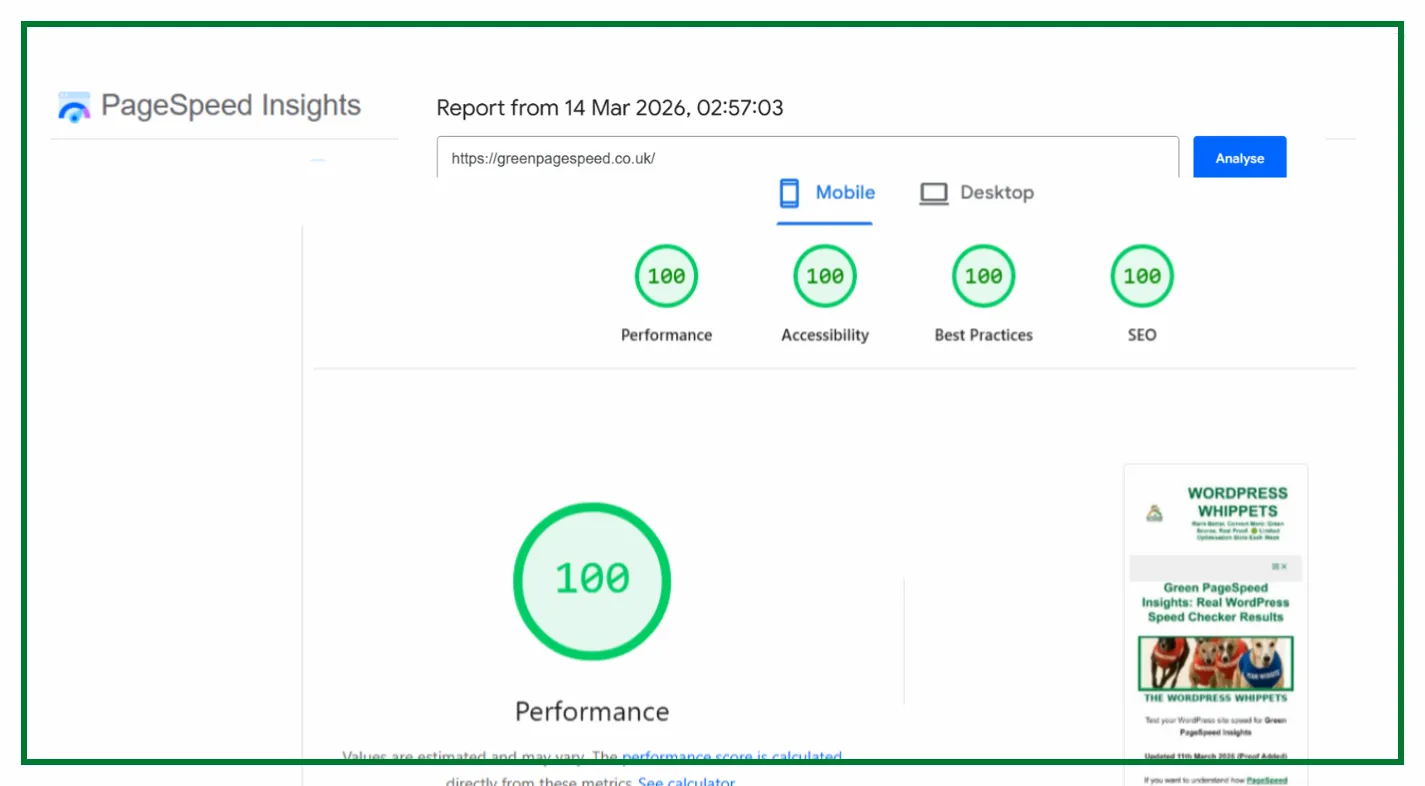
✅ Independently verified by Google PageSpeed
Try a FREE website speed check below
🔗 TEST YOUR SITE SPEED NOW
**PSI is a testing tool, not an endorsement.**
One Job P/Day =FULL FOCUS
We only take on one website per day, because rushing speed work doesn’t cut it.
Your site gets our full focus, and every detail is tuned for performance.
This hands-on approach consistently changes your PSI scores to green. It boosts Google rankings.
You will attract more traffic, more visibility, and ultimately, more business.
However, the good news is that once you know how to use Google PageSpeed Insights properly,
You’ll uncover exactly what’s dragging your site down and how to fix it for good.
Afterwards, look at the homepage and check out the full service that delivers these kinds of results shown on the “Live Results” page. (Updated Daily)
You pay upfront, and we do the work fast.
There are no hidden costs.
✅ Mobile-first
✅ Core Web Vitals fixed
✅ Google Green scores achieved
✅ Before & after proof
✅ 100% UK-based, WordPress-only service
✔️ GREEN SCORES, OR YOUR MONEY BACK✔️
PageSpeed Insights (PSI) uses Lighthouse to power every performance audit.
It is packaged differently and aimed at a wider audience.
We Compare PageSpeed Tests, So You Don’t Have To
We’ve also compared PageSpeed Insights with other popular speed tools – check them out below:
Read this
Firstly, PageSpeed Insights: Mobile vs Desktop
Then
PageSpeed Insights vs SpeedVials
And
PageSpeed Insights vs DebugBear
Then
Also
PageSpeed Insights vs WebPageTest
And
PageSpeed Insights vs Uptrends
Then
PageSpeed Insights vs GTMetrix
As Well As
If you have any queries,
Please go to our…
So why do both exist, and which one should you rely on for accurate speed scores and SEO data?
This guide explains how the tools connect and what separates them.
Ultimately, which PageSpeed test should you focus on if you care about rankings and user experience?
We host Green Page Speed on WPX — fast, secure, and independently tested in all our PageSpeed proofs.
Try WPX Hosting (affiliate link)
Why Lighthouse Has No Standalone Website Tester
Unlike tools such as PageSpeed Insights or GTmetrix, Lighthouse does not have a public website.
Therefore, you can’t enter a URL and run a test. Lighthouse is not a hosted service.
No, it is an open-source auditing framework that runs inside Chrome DevTools or through the command line.
Google never released a separate web interface for it; PageSpeed Insights already provides that.
An important point to note is that the power is from the same Lighthouse engine.
When you test a site on PSI, you are effectively running Lighthouse on Google’s servers.
The difference is that it has added real-user field data from Chrome UX (CrUX).
To run Lighthouse directly, you must do it locally in Chrome or through Node.js.
The results will depend on your computer’s performance, browser load, and network conditions.
That is why most people prefer to use PageSpeed Insights instead. It is faster, consistent, and already integrated with Google’s ranking systems.
How PageSpeed Insights Uses Lighthouse
PageSpeed Insights uses the same Lighthouse engine and runs it on Google’s servers.
This is instead of your device. It ensures that every PageSpeed test uses identical conditions.
In other words, with fixed network throttling, hardware settings, and location controls.
The result is a level playing field where every website is tested under the same circumstances.
PSI adds something Lighthouse does not have: field data from the Chrome User Experience (CrUX) report.
Field data shows how real users experience your site, rather than what a simulation predicts.
It measures Core Web Vitals from actual Chrome visitors from all around the world.
It then merges that information with the Lighthouse lab results.
That combined dataset makes PageSpeed Insights the version that actually matters for rankings.
LightHouse alone cannot influence SEO because its results never leave your computer.
Instead, PSI’s data feeds into Google’s understanding of real-world site performance.
PageSpeed Insights also narrows the audit to four categories that matter to most site owners:
Performance, Accessibility, Best Practices, and SEO.
It drops developer-heavy sections such as PWA auditing, so it loads quickly.
It then presents scores that are easy to understand.
PageSpeed Insights vs Lighthouse: Key Differences
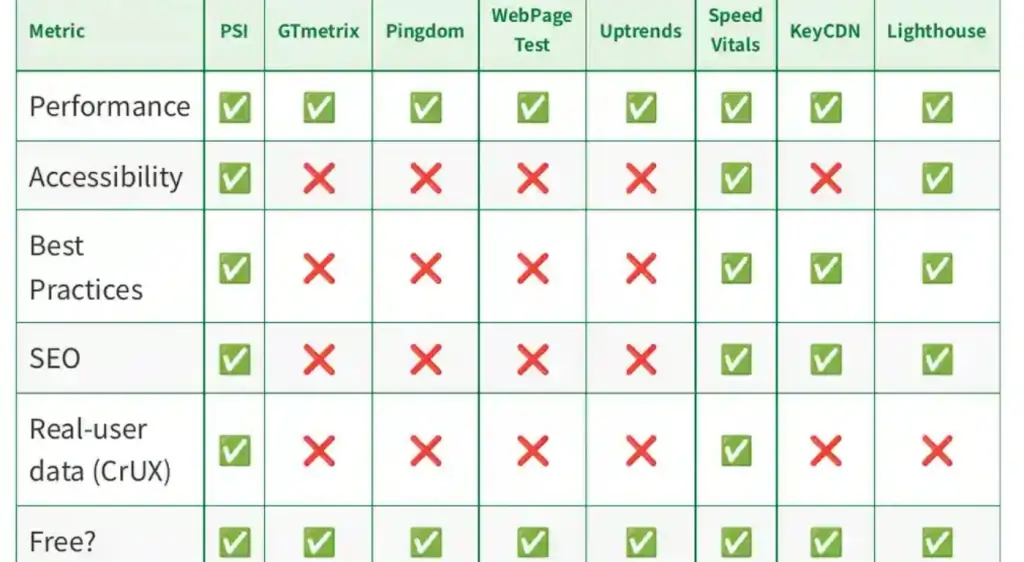
| Feature | Lighthouse | PageSpeed Insights |
|---|---|---|
| Where it runs | Locally in Chrome | On Google’s servers |
| Data type | Lab data only | Lab and field data combined |
| Audience | Developers | Site owners and marketers |
| PWA checks | Yes | No |
| Ranking relevance | Indirect | Direct |
| Device conditions | Based on your machine | Controlled and consistent |
| Output style | Technical detail | Clean, shareable results |
In short, Lighthouse is the raw engine, and PageSpeed Insights is the finished car.
Both perform PageSpeed tests, but PSI delivers the official results that Google Search and Core Web Vitals rely on.
Which One Of The PageSpeed Tests Should You Use?
If you are a developer building a site locally or testing a staging version, Lighthouse is a helpful tool.
It is helpful because it works offline and shows deep diagnostic data.
It is great for finding specific issues such as render-blocking JavaScript, unused code, or layout instability.
For everyone else, PageSpeed Insights is the only tool that truly matters.
It runs on Google’s own servers, it includes real-user metrics, and its results are what influence your search visibility.
When you see 100 out of 100 on PSI, that score represents your site’s real standing inside Google’s ecosystem, not a synthetic local estimate.
Every proof screenshot on this website is from PageSpeed Insights, which runs on the same Lighthouse engine but under official conditions.
That consistency is why our results stay green day after day, even when local Lighthouse runs might show variations.
Why Lighthouse Scores Often Look Lower
Many users panic when Lighthouse shows a lower number than PageSpeed Insights.
However, the reason is almost always environmental.
When you run Lighthouse with multiple browser tabs open, background software is running.
Maybe power-saving mode is enabled, and as a result, the CPU has less capacity.
Lighthouse treats slowdowns as part of the site’s performance and lowers the score.
PageSpeed Insights removes that problem entirely by using Google’s own clean servers.
That is why your PSI score remains consistent.
It is not that Lighthouse is wrong; it is simply measuring under less controlled conditions.
This difference is important to explain, as clients and beginners assume they have two conflicting reports.
In reality, they are seeing the same engine operating in two different environments.
The SEO Perspective on PageSpeed Tests
From an SEO standpoint, Google does not care what your local Lighthouse test shows.
The algorithm will use Core Web Vitals metrics that it learns from real Chrome users.
It also learns from the lab data generated on Google’s PSI servers.
That means PageSpeed Insights is the one that feeds ranking signals back into Search Console and your overall site quality score.
Publishing strong PSI results proves to both Google and potential clients.
It proves that your website performs flawlessly in the environment that actually counts.
Local Lighthouse runs are excellent for learning and troubleshooting.
However, they do not contribute to visibility or credibility.
To Sum Things Up
Lighthouse powers the audits. PageSpeed Insights delivers the results that matter.
Both are valuable, but they serve different purposes.
If you want the technical depth for development, use Lighthouse.
However, if you need the real-world PageSpeed scores that reflect Google’s view of your site, use PageSpeed Insights.
It combines lab and field data, runs under fixed conditions, and directly impacts your Core Web Vitals performance.
To see what a perfect PSI audit looks like, visit our Green Page Speed Proof Wall and check the latest 100/100 results for both mobile and desktop.
Those daily updates are proof that when you optimise correctly, consistent green scores are possible and sustainable.
So, if we were forced to choose between PageSpeed Insights vs Lighthouse, then it would be PageSpeed Insights all the way.