
PageSpeed Insights vs KeyCDN Speed Test: Which one should you use?
When it comes to measuring real performance, website owners often find themselves comparing them.
Click here to access the green PageSpeed test proof wall and scroll down.
Updated 1st March 2026
Run a Google PageSpeed Test for Your Website (Free Tool Below)
⚠️MOST WEBSITES SCORE UNDER 50
HOW ABOUT YOURS?
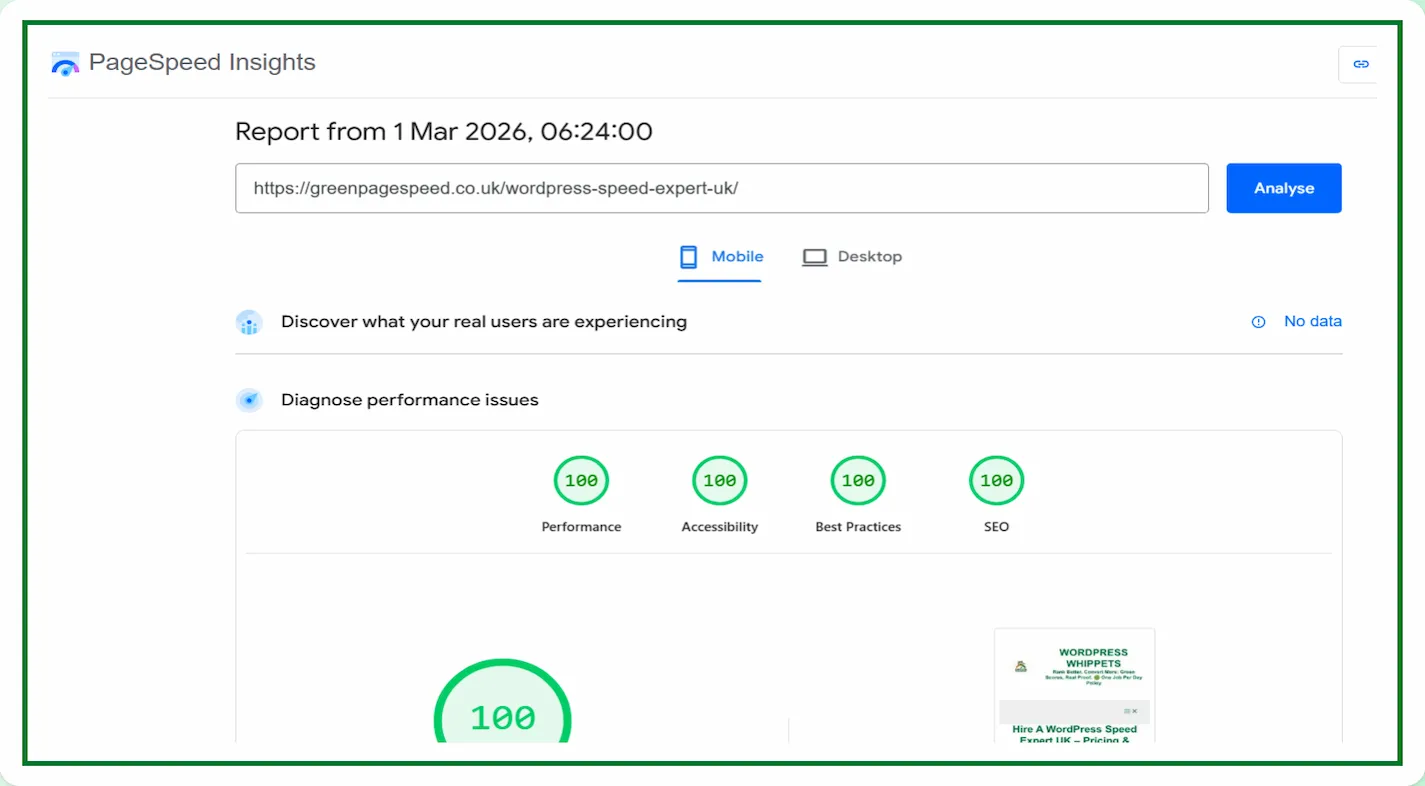
✅ Independently verified by Google PageSpeed
Try a FREE website speed check below
🔗 TEST YOUR SITE SPEED NOW
**PSI is a testing tool, not an endorsement.**
A genuine endorsement of our performance work
You can read the official WPX appraisal below.
WPX APPRAISAL
One Job P/Day =FULL FOCUS
We only take on one website per day, because rushing speed work doesn’t cut it.
Your site gets our full focus, and every detail is tuned for performance.
This hands-on approach consistently changes your PSI scores to green. It boosts Google rankings.
You will attract more traffic, more visibility, and ultimately, more business.
However, the good news is that once you know how to use Google PageSpeed Insights properly,
You’ll uncover exactly what’s dragging your site down and how to fix it for good.
Afterwards, look at the homepage and check out the full service that delivers the results shown on the “Live Results” page. (Updated Daily)
You pay upfront, and we do the work fast.
There are no hidden costs.
✅ Mobile-first
✅ Core Web Vitals fixed
✅ Google Green scores achieved
✅ Before & after proof
✅ 100% UK-based, WordPress-only service
✔️ GREEN SCORES, OR YOUR MONEY BACK✔️
Both tools provide valuable data, but one of them gives you direct feedback.
It is feedback from the same company that decides how fast pages rank in search results.
That alone makes a big difference.
This guide will explore how both tools work.
It will explore what they measure and why PageSpeed Insights remains the best long-term option.
Yes, the best option for understanding real user experience and building search visibility.
We host Green Page Speed on WPX — fast, secure, and independently tested in all our PageSpeed proofs.
Try WPX Hosting (affiliate link)
What Google PageSpeed Insights Actually Does
Google PageSpeed Insights (PSI) analyses how a page performs using both simulated and field data.
The lab side utilises Lighthouse, while the field side collects data from actual Chrome users.
It does this through the Chrome UX Report.
This dual approach allows you to see how your page tests perform under controlled Conditions and how it performs for real users on actual devices.
Each test returns a performance score between 0 and 100 for both mobile and desktop devices.
Alongside that, you get Core Web Vitals such as:
-
Largest Contentful Paint (LCP) – how fast the main content appears
-
Interaction to Next Paint (INP) – how quickly your page reacts to user input
-
Cumulative Layout Shift (CLS) – how stable the layout remains while loading
Google highlights what needs fixing and even shows you how to make the necessary corrections.
That makes PSI more than a diagnostic tool. It becomes a roadmap.
What KeyCDN Website Speed Test Offers
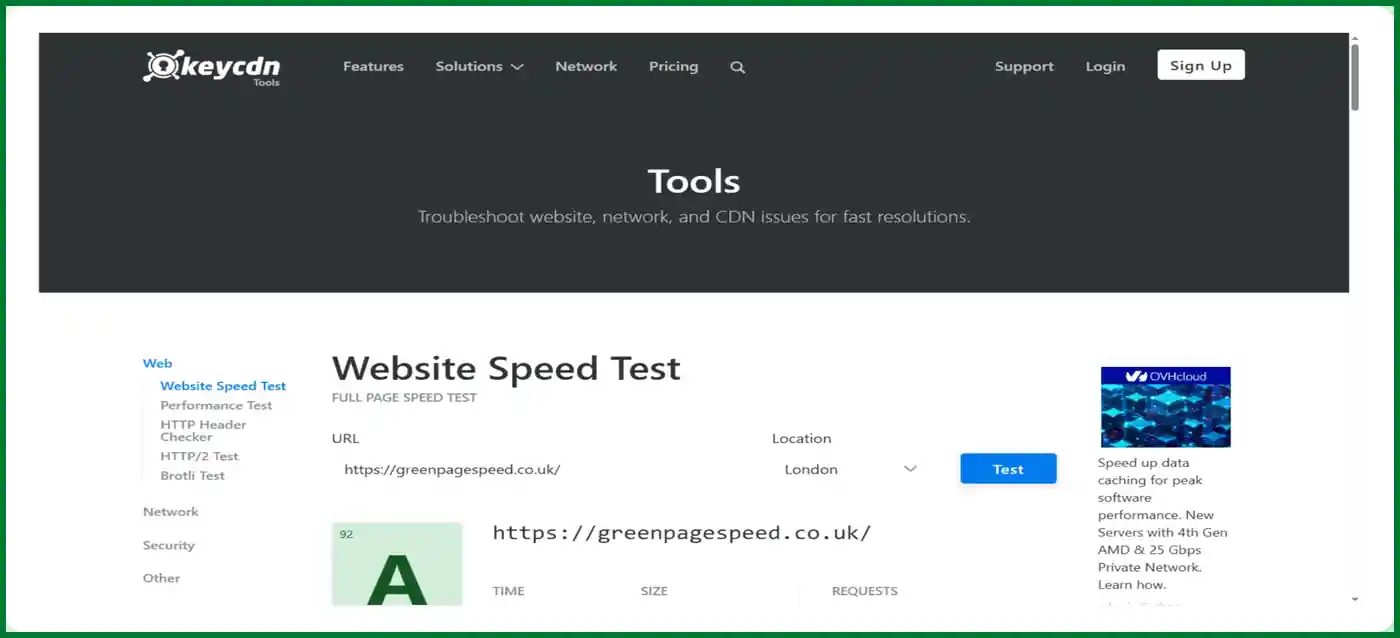
KeyCDN’s Website Speed Test is a free tool that focuses on download speed and network performance.
You can choose from several test locations worldwide and see how your site loads from those areas.
It provides a waterfall view of requests, file sizes, and response times.
For developers and server admins, KeyCDN’s tool is useful.
It helps to confirm whether a CDN is caching properly or if certain assets are slow to respond.
However, it lacks one essential element: connection to search ranking signals.
KeyCDN provides you with data on how quickly your site downloads.
However, importantly, Google PageSpeed Insights gives you insight into how Google evaluates your site’s experience. That is a critical distinction.
The Difference Between Testing Speed And Testing Experience
Website speed is not only about how fast bytes move across a network.
It is about how quickly a visitor can see, interact, and stay engaged.
PageSpeed Insights focuses on user-centred metrics that affect real perception.
When you improve those metrics, you are directly improving the kind of experience Google rewards in its ranking systems.
KeyCDN’s results can tell you your site loads in 1.2 seconds in London and 1.8 seconds in Singapore,
Although that information alone does not tell you if your text shifts, or if your images block rendering.
Or even if the first interaction feels smooth.
Pagespeed Insights tells you this.
That is why digital marketers, SEO professionals, and WordPress optimisation specialists rely heavily on PSI when making performance decisions.
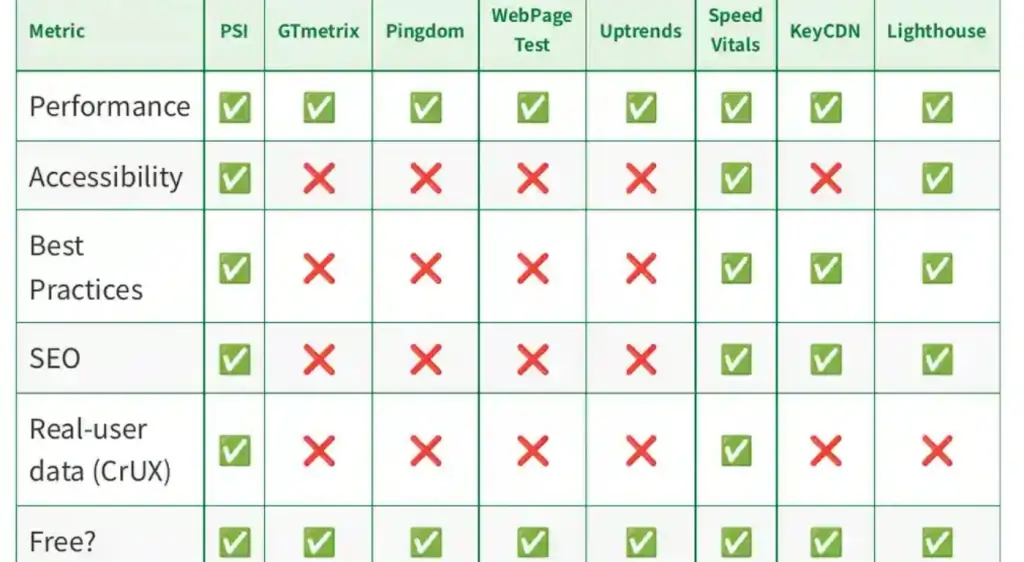
PageSpeed Insights vs KeyCDN: Why PageSpeed Insights Helps SEO directly
PageSpeed Insights is the only speed tool that directly reflects Core Web Vitals.
These are confirmed ranking signals. Improving those numbers can increase your visibility in Google Search.
When your PSI report shows a “Good” status for all three vitals, you are not just fast.
You are optimised for user satisfaction, which means Google’s algorithms are more likely to push your site upward.
KeyCDN does not feed into those ranking signals.
It supports performance validation, but it is not connected to Google’s perception of your site.
That makes PSI the primary scoreboard that actually matters.
The Psychological Advantage of Using PSI
Because PSI is public, measurable, and trusted, you can share your results with confidence.
A verified 100/100 score carries weight because it is visible proof based on Google’s own measurement system.
KeyCDN scores cannot be compared that way. They lack a universal benchmark.
You might improve load time by 300 milliseconds, but there is no single score that tells your audience or clients that you achieved perfection.
This is one reason why optimisation services that specialise in PSI results, such as Green Page Speed, attract attention. Proof matters.
Real-World Testing Locations vs Real-World Ranking Insight
One of KeyCDN’s strongest features is the ability to test from different regions.
If you serve visitors from multiple continents, it is valuable to see the latency from each area.
However, that benefit can be matched by any CDN or host with built-in global monitoring.
What KeyCDN cannot provide is how those variations affect real Chrome users in aggregate.
PageSpeed Insights draws on billions of data points collected from actual Chrome sessions.
That is genuine field data, not a simulation.
So while KeyCDN tells you how a single request performs from Singapore,
PSI tells you how thousands of your users experienced the page during the past 28 days.
That makes its numbers statistically meaningful for SEO and user trust.
We Compared PageSpeed Tests, So You Don’t Have To
We’ve also compared PageSpeed Insights with other popular speed tools – check them out below:
Firstly, PageSpeed Insights: Mobile vs Desktop
Then
PageSpeed Insights vs DebugBear
Then
Also
PageSpeed Insights vs WebPageTest
And
PageSpeed Insights vs SpeedVitals
Also
PageSpeed Insights vs Uptrends
As well as
Finally
PageSpeed Insights vs Lighthouse
Let’s break it down and find out why PageSpeed Insights is still the best option in 2025
It will pinpoint your issues, thus allowing you to become aware of them.
PageSpeed Insights vs KeyCDN: Working Together, But Prioritising The Right One
You can certainly use both tools. KeyCDN is great for checking CDN response times, cache status, or debugging heavy assets. But the real focus should always remain on PSI.
A simple workflow looks like this:
-
Run a baseline PageSpeed Insights test. Record your mobile and desktop scores, and note LCP, INP, and CLS.
-
Identify and fix the issues. Optimise images, minify CSS, reduce unused code, and clean up scripts until you reach a green score.
-
Confirm global delivery with KeyCDN. Once you know your site performs well by Google’s standards, test a few locations to make sure CDN distribution is efficient.
-
Re-run PSI regularly. This ensures your optimisations will still deliver a top-tier experience month after month.
Following this process keeps you focused on the metrics that truly influence visibility while still validating your infrastructure with KeyCDN.
Common Misunderstandings About PageSpeed Insights
Many website owners misread PSI as a pure “speed test.” It is not. It is a quality audit.
A page that loads in 1.5 seconds, but layout shifts and delayed input can still score low.
Another page that loads in 2 seconds but remains visually stable and interactive can score higher.
PSI rewards smoothness, not just raw speed.
This nuance is what separates it from most testing platforms.
The more you learn to interpret the PSI report, the easier it becomes to make optimisations that actually improve user satisfaction and rankings.
PageSpeed Insights vs KeyCDN: Why Green Page Speed Favours PSI Results
At Green Page Speed, we update daily proof scores directly from Google PageSpeed Insights.
We do this because PSI represents the ultimate benchmark that users, search engines, and developers all recognise.
Every 100/100 screenshot we publish is evidence that our workflow delivers real, measurable results.
The kind of proof we have cannot come from network-based tools alone. It must come from Google’s own measurement system.
When potential clients or plugin developers see consistent PSI scores across months of updates,
They know the site architecture, hosting, and optimisation process are truly effective.
PageSpeed Insights vs KeyCDN: Our Conclusion
Both Google PageSpeed Insights and KeyCDN Website Speed Test serve a purpose.
KeyCDN is valuable for technical verification and CDN evaluation.
But when it comes to the metrics that influence SEO, rankings, and user satisfaction,
PageSpeed Insights stands alone.
It measures exactly what Google’s algorithms care about.
It gives actionable guidance you can implement immediately.
It provides a transparent, repeatable score that proves performance in a way everyone understands.
For that reason, if you have to choose where to invest your time and effort, choose PageSpeed Insights.
Use KeyCDN as a supporting check, but treat PSI as your north star.
Optimise for it, track it daily, and you will build a faster, more reliable, and more visible WordPress site.