
No fluff. The complete guide to fix Google’s PageSpeed Insights.
What scores mean, yes, how to fix issues, and real proof it works.
Updated 1st March 2026
Below, we explain what each PageSpeed Insights result means in 2026.
From performance scores to Core Web Vitals, using real data collected daily.
You can read more about PageSpeed Insights scores here.
Tracking PageSpeed Insights updates and score changes daily.
PageSpeed Insights now reflects the latest Lighthouse updates, including Interaction to Next Paint (INP) as the primary responsiveness metric and refinements to how lab and field data are reported. Reports can also be shared as snapshots that remain available for a limited time.
We have monitored Google PageSpeed Insights score updates throughout 2025.
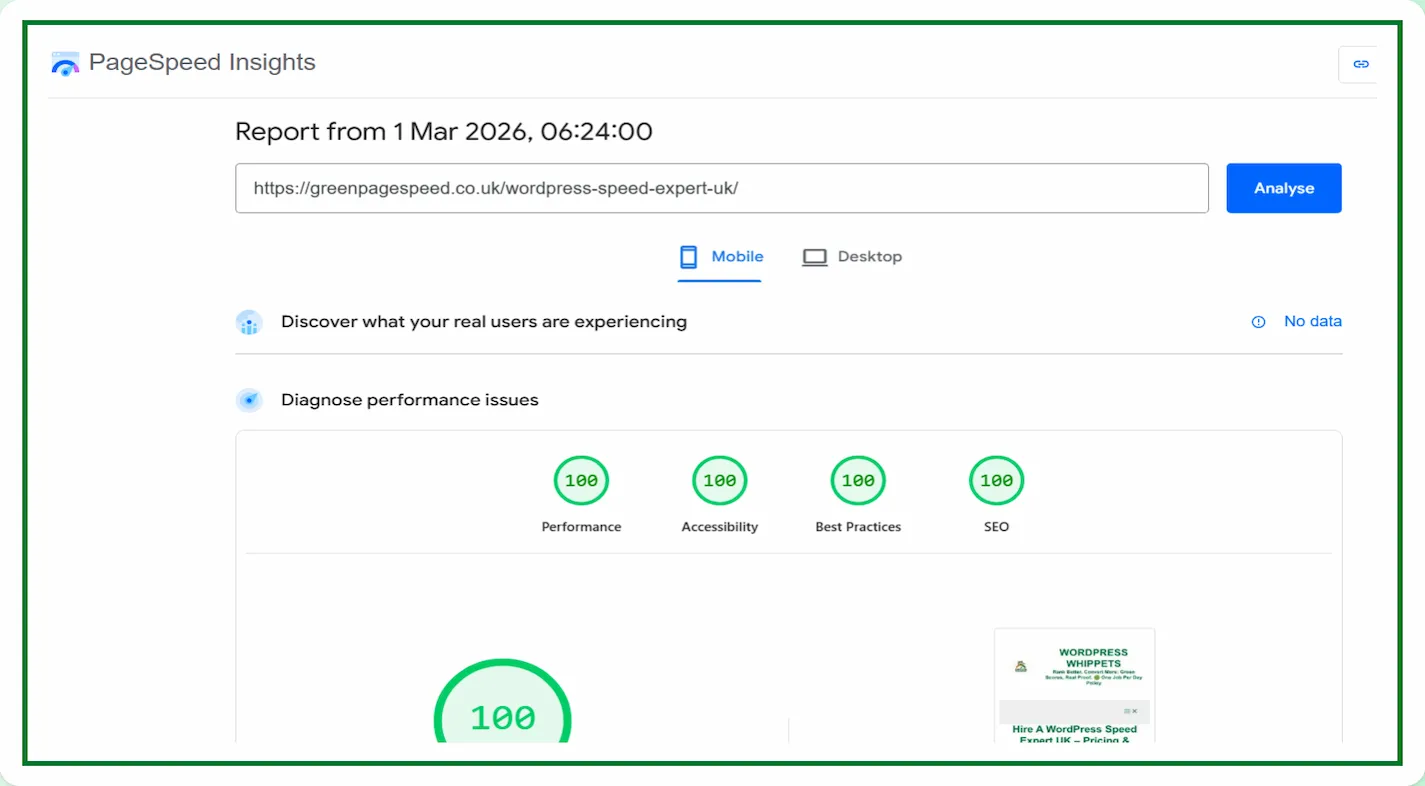
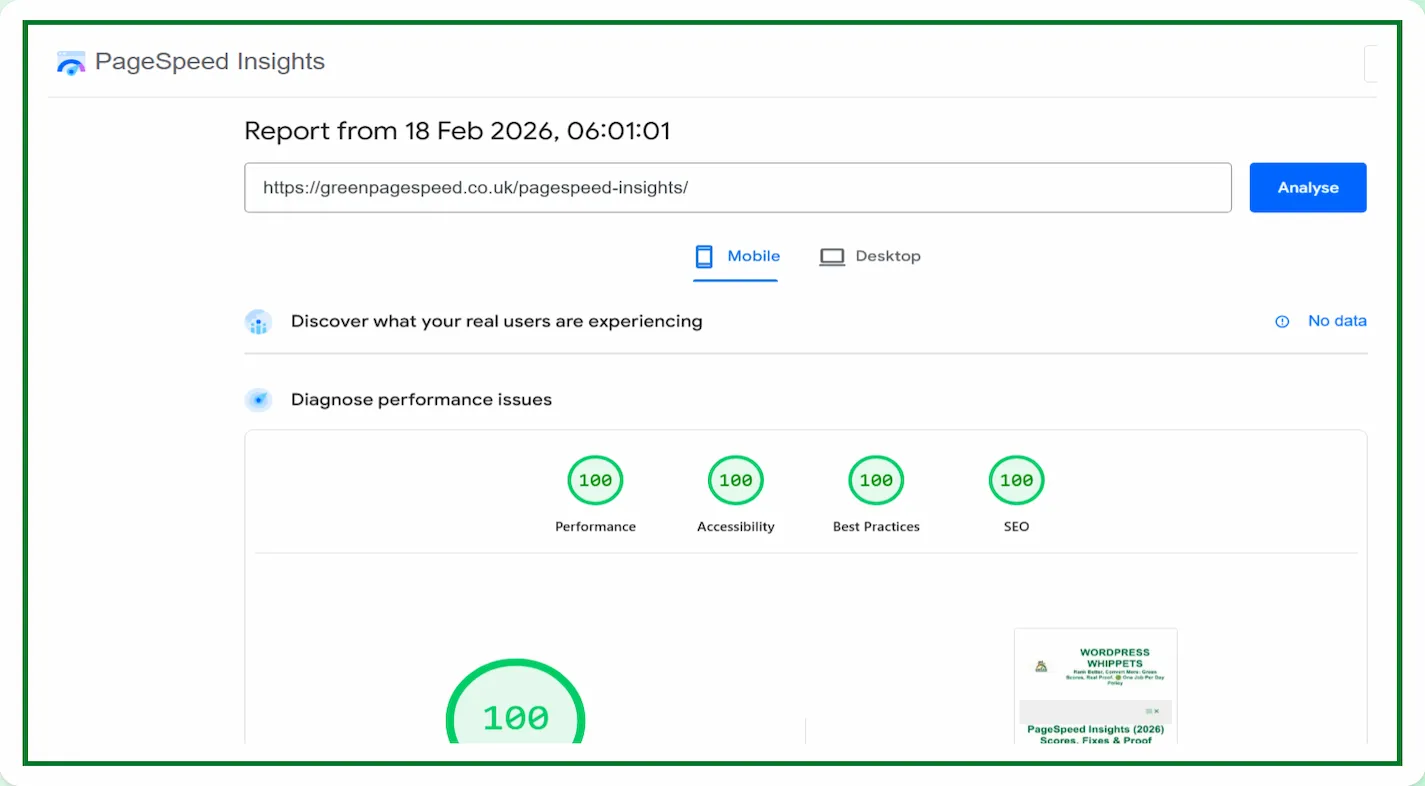
We record real test results below
CLICK HERE TO LOOK AT MANY MORE PROOF SCREENSHOTS
Core Web Vitals results, updated daily.
Run a Google PageSpeed Test for Your Website (Free Tool Below)
Speed Check Your Website On Google. It’s simple, fast, and FREE
⚠️MOST WEBSITES SCORE UNDER 50
HOW ABOUT YOURS?
✅ Independently verified by Google PageSpeed
Try a FREE website speed check below
🔗 TEST YOUR SITE SPEED NOW
**PSI is a testing tool, not an endorsement.**
A genuine endorsement of our performance work
You can read the official WPX appraisal below.
WPX APPRAISAL
One Job P/Day =FULL FOCUS
We only take on one website per day, because rushing speed work doesn’t cut it.
Your site gets our full focus, and every detail is tuned for performance.
This hands-on approach consistently changes your PSI scores to green. It boosts Google rankings.
You will attract more traffic, more visibility, and ultimately, more business.
However, the good news is that once you know how to use Google PageSpeed Insights properly,
You’ll uncover exactly what’s dragging your site down and how to fix it for good.
You pay upfront, and we do the work fast.
There are no hidden costs.
✅ Mobile-first
✅ Core Web Vitals fixed
✅ Google Green scores achieved
✅ Before & after proof
✅ 100% UK-based, WordPress-only service
✔️ GREEN SCORES
, OR YOUR MONEY BACK✔️
“Can you guarantee I’ll get green PageSpeed Insights Test scores?”
Without a doubt, we guarantee a significant speed boost.
Most clients achieve scores of 90–100 on Google PageSpeed Insights.
If we fail to deliver green results across the core metrics, you’ll receive a full refund.
Our daily proof results reinforce these real scores.
- ? Safe backup
- ⚡ Green scores
- ? Real proof
We Compared PageSpeed Tests, So You Don’t Have To
We’ve also compared PageSpeed Insights with other popular speed tools – check them out below:
Firstly, PageSpeed Insights: Mobile vs Desktop
Then
PageSpeed Insights vs DebugBear
Then
Also
PageSpeed Insights vs WebPageTest
And
PageSpeed Insights vs SpeedVitals
Also
PageSpeed Insights vs Uptrends
As well as
Finally
PageSpeed Insights vs Lighthouse
Let’s break it down and find out why PageSpeed Insights is still the best option in 2026.
It will pinpoint your issues, thus allowing you to become aware of them.
Learn what Google PageSpeed Insights scores mean, how to fix key issues, and see real proof below that our optimisation methods work.
Hire a PageSpeed Expert in 2026 (Real-World Fixes)
What is a good Google PageSpeed Insights score? Green (90–100). Focus on passing Core Web Vitals, LCP, INP and CLS, rather than chasing a brittle 100.
What does “green PageSpeed” mean? Your page meets Google’s Core Web Vitals thresholds in PSI’s field data, so real visitors experience fast loads and stable pages.
We host Green Page Speed on WPX — fast, secure, and independently tested in all our PageSpeed proofs.
Try WPX Hosting (affiliate link)
Google PageSpeed Insights Updates (2026)
- 📅January 2026: We continue to monitor PageSpeed Insights scoring. Our daily proof still holds 100/100 scores across the site.
⚠️MOST WEBSITES SCORE UNDER 50
HOW ABOUT YOURS?
✅ Independently verified by Google PageSpeed
? TEST YOUR SITE SPEED NOW
**PSI is a testing tool, not an endorsement.**
Want help improving your PageSpeed score?
We’ll break it down clearly and help you get the fastest, most stable site possible
Which speed tool do you use most often?
Core PageSpeed Insights Points Explained
Discover what your PageSpeed Insights scores reveal, how to improve them, and view genuine proof on every page that performance fixes = results.
-
First, when nothing appears for ages. PageSpeed highlights LCP and render-blocking resources. You can inline critical CSS, defer non-critical JS and preload the hero.
-
Next, if clicks feel laggy: PSI’s INP and long-task data show which scripts block the main thread. Split bundles, and also delay all of the things that you do not need.
-
Meanwhile, if the layout jumps, CLS and its sources tell you where to reserve space or add
aspect-ratio.How to Get Green PageSpeed Test Scores (90+) in 2026
-
On mobile, when scores tank: PSI’s mobile run exposes CPU/network limits; trim JS, ship smaller images and avoid desktop-only scripts.
-
However, if users still complain despite good lab scores: the 28-day field panel reveals real-world pain; fix in the lab, then wait for the field trend.
-
If cold loads crawl: TTFB diagnostics point to caching/CDN/server work before front-end tweaks.
-
When fonts block text: PSI flags render-blocking fonts. Add
font-display and swap, then, you have topre-load the primary face and subset. -
If third-party tags dominate: the third-party summary shows the worst offenders; remove, defer or swap to lighter options.
-
When images consume bandwidth: “properly size” and “modern formats” make the case for responsive WebP/AVIF and lazy loading.
When images consume bandwidth: “properly size” and “modern formats” make the case for responsive WebP/AVIF and lazy loading.
“Speed isn’t about chasing a 100 score – it’s about delivering a fast, stable experience for every visitor.”

As we explain throughout this guide to Google’s PageSpeed Insights, knowing what your scores mean is only half the story; fixing them correctly and proving the results matter is more important.
PageSpeed Insights Fixes That Actually Work in 2026
-
If the hero lands late, PSI names the LCP element; keep it small and preload it.
-
For heavy videos/embeds: Confirm the hit with CLS and transfer size; use placeholders and click-to-play.
-
When requests explode: totals and waterfalls reveal duplication; load only what’s used and code-split.
-
If scrolling/animations stutter: diagnostics point to non-composited effects; animate
transform/opacityonly. -
When repeat visits aren’t faster: cache policy checks push you to long-lived, hashed assets on the CDN.
-
If the codebase feels bloated, “unused CSS/JS” quantifies waste; conditionally enqueue and tree-shake.
-
And finally, if the first page is slow but navigation is snappy: optimise the entry route – HTML weight, critical CSS and the first JS chunk.
What this page does: Google PageSpeed Insights (PSI) analyses your page.
It will use Lighthouse and Chrome UX Report (CrUX). It then reports Core Web Vitals: LCP, INP, CLS.
Use it to spot what slows real users and fix those first.
- Run your URL in PSI.
- Compare Field data (real users) vs Lab data (simulated).
- Open Opportunities and note the biggest wins.
- Prioritise LCP, INP, CLS.
- Ship changes and re-test.
What is PageSpeed?
PageSpeed (often shorthand for Google PageSpeed Insights) is a performance score out of 100.
Plus Core Web Vitals: LCP, INP, CLS, they will show how fast a page loads and responds for users.
Field vs Lab: Why Scores Differ For PageSpeed Tests?
Field uses anonymised CrUX data from real visitors on real devices/networks.
Lab uses Lighthouse in a controlled run. Fix Field failures first; they reflect your users.
| Metric | Good | Needs improvement | Poor |
|---|---|---|---|
| LCP | < 2.5s | 2.5–4.0s | ≥ 4.0s |
| INP | < 200ms | 200–500ms | ≥ 500ms |
| CLS | < 0.1 | 0.1–0.25 | ≥ 0.25 |
Site Speed Prioritiser
Select your main issue, and we’ll generate a plan for you:
Our PageSpeed tests prove that every site we optimise reaches green scores. Scroll down slightly.
Additionally, you also give users a better user experience,
And, you will achieve lightning-fast load times.
See the evidence in screenshots?
This no-fluff guide shows you exactly how to use Google PageSpeed the right way.
A staggering 91% of mobile websites fail Google’s Core Web Vitals.
This directly powers the PageSpeed Insights score.
Source: Web Almanac – Performance Chapter
PageSpeed Looks Like This
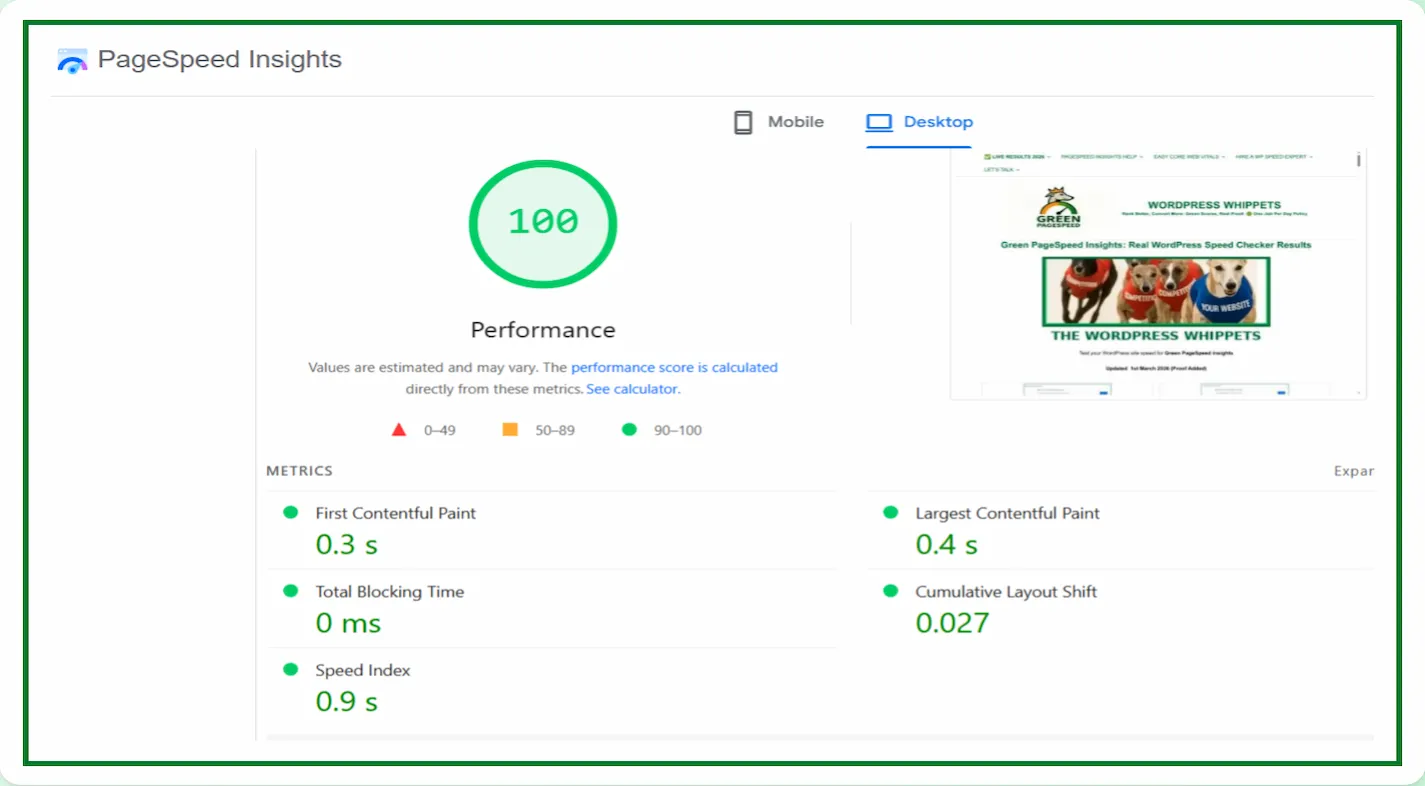
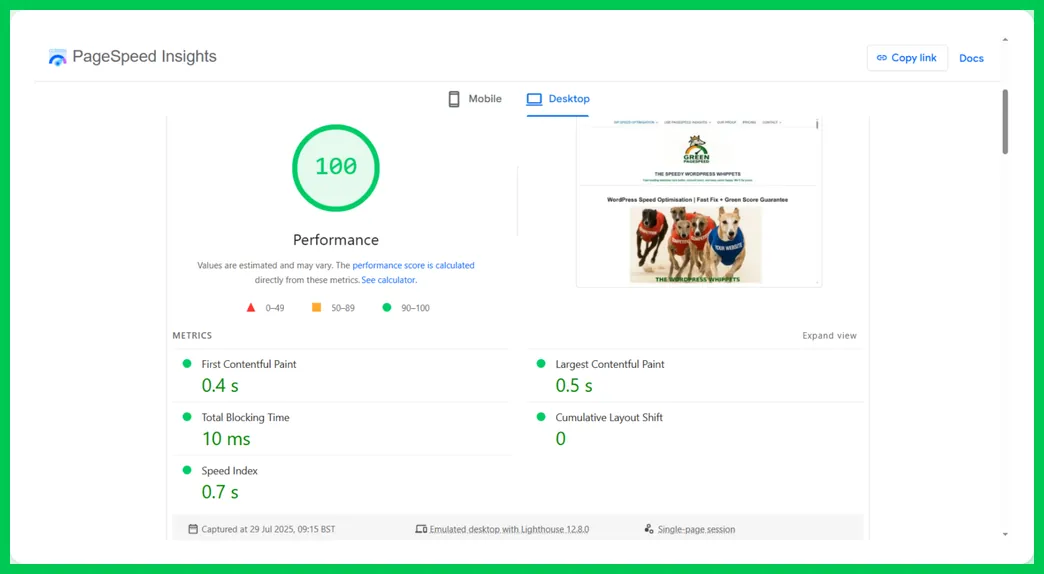
Moreover, this is what a perfect pageSpeed looks like.
We’ve achieved a fantastic 100/100 scores across the board.
Hence, we’ll walk you through exactly how to do it.
Google PageSpeed Scores
Read this Google PageSpeed Insights guide for 2025. How to Use It?
It is more than just a performance tool.
It’s often the first warning sign that your WordPress site is costing you traffic, sales, and trust.
53% of mobile visitors leave a page that takes longer than 3 seconds to load.
This is the reason you must begin using Google PageSpeed.
However, fear not, as we help businesses worldwide understand.
Then they improve their PageSpeed Insights scores.
To begin with, we have a particular focus on WordPress sites, especially those hosted in the UK.
Even though we do optimise websites from around the globe.
WordPress Speed Optimisation Is Required
If your site is running slowly, then there is only one thing that you must do. To what am I referring?
You will need to employ a WordPress speed optimisation service here in the UK.
Here you can read more if you wish to improve your speed.
✅ A no-fluff, just facts chart below.
How Google PageSpeed Measures Up In Comparison
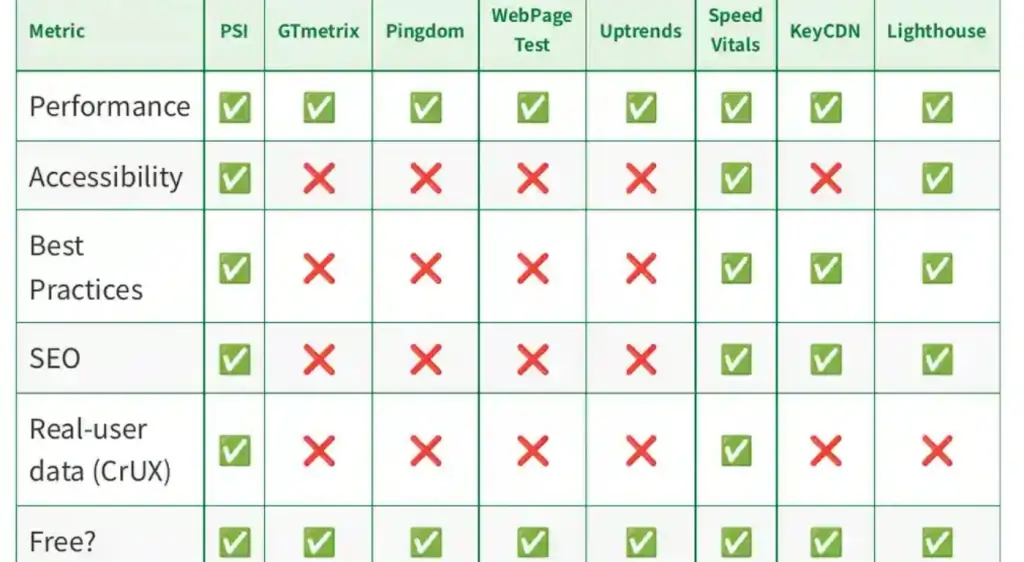
Consequently, most site owners will ignore the signals or misread the data on Google PageSpeed.
This leaves their sites stuck in the slow lane while competitors race ahead.
Frustrating.
Google has confirmed that site speed is a ranking factor, especially for mobile users.
Source: Google Webmasters Blog
It helps you attract more traffic, more visibility, and ultimately, more business.
However, the good news is that once you know how to use Google PageSpeed Insights properly in 2026.
You’ll uncover exactly what’s dragging your site down and how to fix it for good.
Afterwards, look at the homepage and check out the full PageSpeed service.
It helps to deliver these results shown on the “Our Proof” page.
The PageSpeed Insights Tool Explained: How to Use It?
Google PageSpeed Insights (PSI) is a free tool developed by Google.
It analyses all the content of a web page and provides performance scores based on real-world data and lab simulations.
It evaluates both mobile and desktop versions of a site and offers actionable suggestions for improvement.
But why does this matter? It matters because performance, especially speed, directly affects your site’s SEO.
(Search Engine Optimisation), user experience, and conversion rates.
? Let’s Check Your Speed (No Obligation)
If you wish us to improve your speed? Check out global pricing on this page.
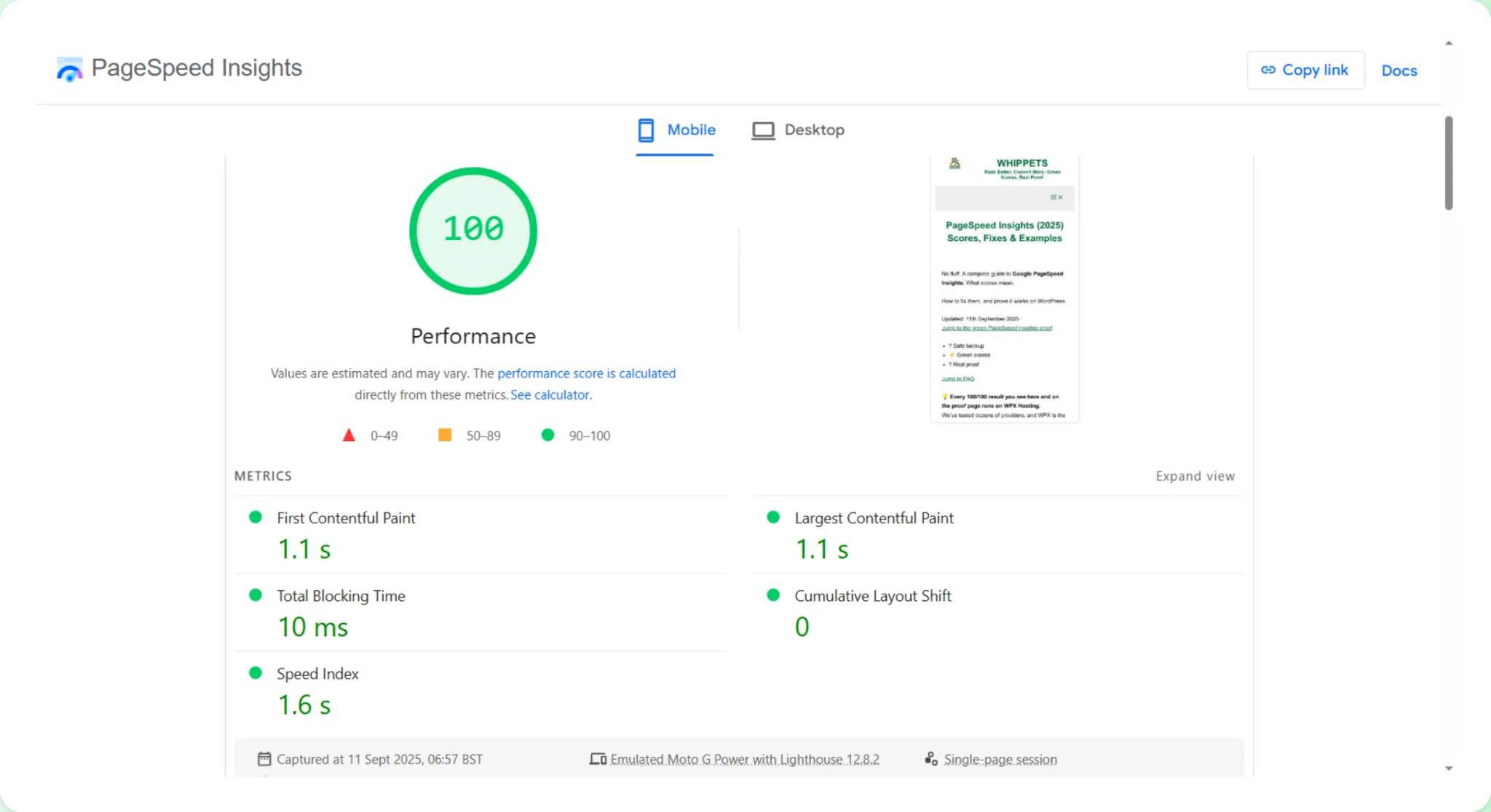
The preview on the right shows the actual website tested.
Every example on this site is ours.
Real results just below?
Help understanding your PageSpeed Insights score?
We’re offering free manual WordPress speed reviews to the next 10 site owners.
Real PageSpeed Insight breakdown
Clear, plain-English advice
No tools, no selling, only help
Drop us a message via the contact form, and the next 10 people will receive a free SiteSpeed check.
Alternatively, if you prefer to go DIY, you can run your test below and try to make sense of the results.
How Google’s PageSpeed Insights Relates to SEO
1. Page Speed Is a Ranking Factor
PageSpeed Insights is explained in the following section. Please, read it carefully and learn it.
Google has openly stated that page speed is one of its many ranking signals.
Fast-loading websites are more likely to appear higher in search engine results, especially on mobile devices.
With mobile-first indexing now the standard, your mobile site performance can make or break your SEO success.
Using Google PageSpeed helps you identify and fix the bottlenecks.
Bottlenecks that could be holding your site back from reaching the top Google positions.
2. Better Speed Improves User Signals
Because a faster site leads to better engagement, your visitors are more likely to stay and click through.
And it converts when a site loads quickly. Google tracks these user behaviours:
-
Bounce rate: The percentage of visitors who leave without taking any action.
-
Session duration: How long people stay on your site.
-
Pages per session: How many pages do they explore?
To begin with, all of these influence your SEO.
Also, a poor experience sends a bad signal to Google.
PageSpeed Insights highlights what’s slowing you down so you can fix it.
3. Helps You Meet Core Web Vitals
In recent years, Google introduced Core Web Vitals, a set of user-focused metrics.
It measures visual stability, interactivity, and loading performance. These include:
-
Largest Contentful Paint (LCP): Measures load speed.
-
First Input Delay (FID): Measures interactivity.
-
Cumulative Layout Shift (CLS): Measures visual stability.
PageSpeed Insights reports on all of these. However, if your site performs poorly,
Your rankings can suffer. Yet this can happen even if your content is well above average.
What is Google PageSpeed Insights?
✅ Instant Performance Audit
Google PageSpeed gives you an immediate breakdown of your site’s strengths and weaknesses.
It’s ideal for webmasters, developers, and business owners who want quick insights.
Without needing advanced technical knowledge.
✅ Actionable Recommendations
PSI doesn’t just give you a score. It explains exactly what’s slowing you down.
It goes from uncompressed images to unused CSS and provides direct suggestions for improvement.
Claim Your Free WordPress Speed Check
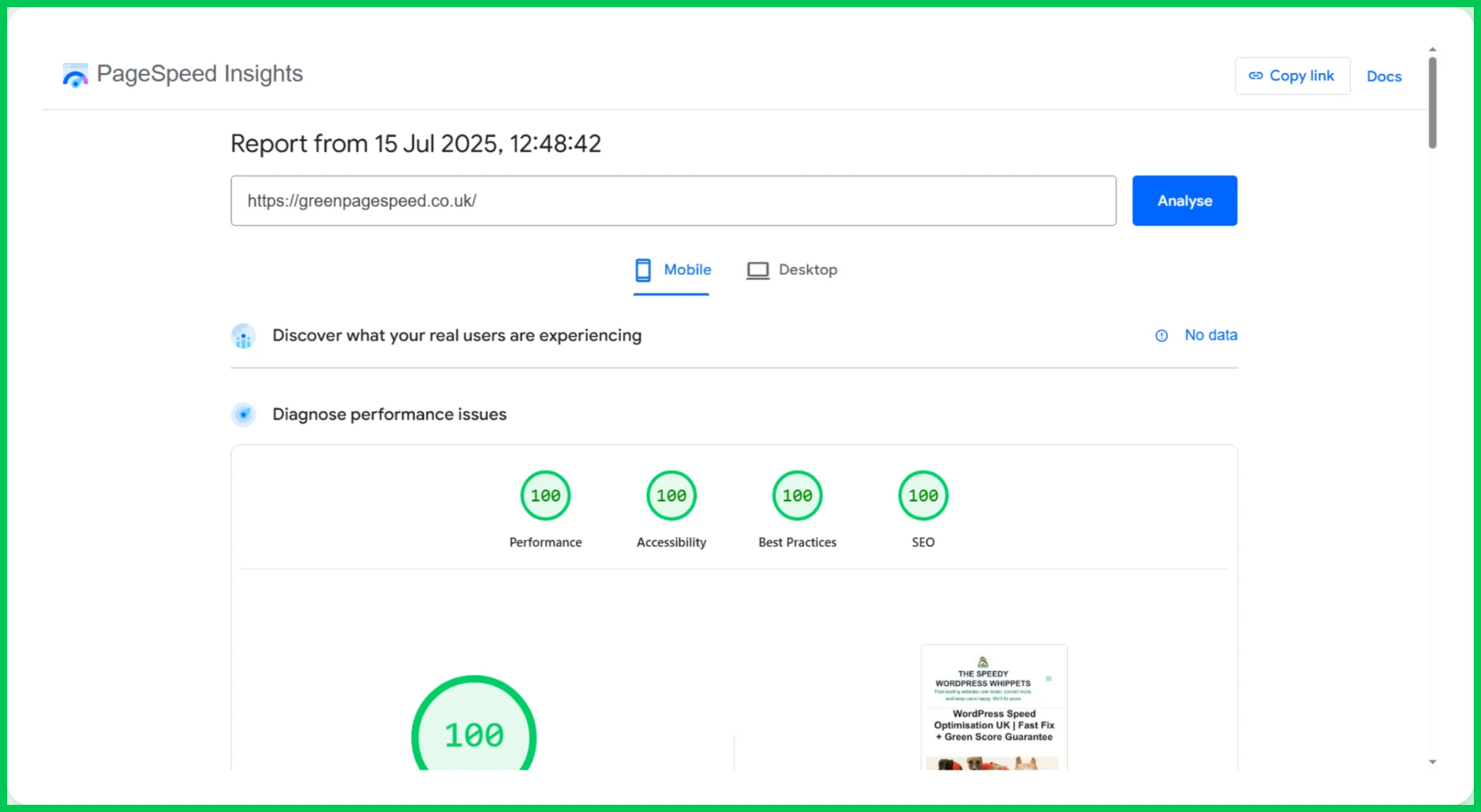
The image below illustrates our perfection.
✅ Mobile and Desktop Analysis For PageSpeed Insights
The PageSpeed tool shows you how your site performs on both mobile and desktop.
Thus, you get a rounded set of results which gives you a better impression of things.
Therefore, since most web traffic is now mobile, this dual analysis is essential for SEO success.
✅ Free and Backed by Google
There’s no cost to use PageSpeed Insights. And because it’s from Google, however.
And yet, still, you will receive recommendations that align with what the search engine itself wants to see.
⚠️ Please don’t pay until we’ve confirmed your site qualifies. Contact us first. ⚠️
We’ll respond quickly and let you know the next steps
Common PageSpeed Insights Issues
No jargon. Just the PageSpeed Insights issues that slow your site.
How to fix them fast is exactly where we come in.
They’re easy to fix when you know what to look for.
PageSpeed Insights helps you pinpoint:
-
Unoptimised images
-
Bloated themes and plugins
-
Render-blocking resources
-
Inefficient JavaScript and CSS
-
No browser caching or CDN
-
Slow server response times
By resolving these issues, you enhance both the user experience and search visibility.
Why Site Speed Matters More Than Ever in 2026
Furthermore, today’s users are more impatient than ever.
Because if your site takes more than 2-3 seconds to load, you risk losing over half your visitors.
Despite the other available options, this one is the best choice you have.
Google’s algorithms continue to evolve, and speed and usability are becoming critical SEO factors.
However, PageSpeed Insights is no longer just a tool for developers;
It’s an essential asset for anyone serious about online growth.

Mobile 100/100 – Google PSI – 11/06/25
How to Make the Most of PageSpeed Insights
Want to make sure you’re using PSI effectively? Here’s how:
-
Check multiple pages: Don’t rely only on your homepage.
-
Besides this, run tests on the important landing pages, blog posts, and product pages you want to rank for the most.
-
Follow up on suggestions: Implement the recommendations you receive, especially those labelled as “high impact.” (A Red Triangle.)
-
Use PSI regularly: Treat it as an ongoing health check for your website, not a one-time fix.
-
Combine it with other tools: Use PSI alongside Lighthouse and Chrome DevTools for deeper insights.
Performance Equals Trust, So Use PageSpeed Insights
Furthermore, using Google PageSpeed Insights regularly helps you stay ahead of the curve in more ways than one.
Hence, it’s not just about faster load times; it’s about a better user experience and a higher Google ranking.
It also, ultimately, increases conversions. And after all, this is what we’re all after.
In a world where seconds cost sales, performance is everything.
Therefore, if you need a no-obligation check on your website’s speed, reach out today.
We’ll tell you exactly what’s slowing you down and how to fix it.
⚠️ Slow site = lost sales. Don’t let that keep happening.
We’ll check your speed for free. However, there’ll be no jargon, no pressure, no catch.
After using this tool, you will finally learn what has been holding you back with your website.
If you wish us to improve your speed? Check out global pricing on this page.
In contrast to these large agencies, which cost over £1000, you will see that we offer unrivalled proof.
Yet our prices are far more affordable. All in all, we hope the evidence on our website speaks for itself. We hope it showcases our capabilities.
If you’ve made it this far, you now understand exactly what PageSpeed Insights scores mean, how to fix the issues that cause drops, and how to prove your results just like we do daily.

A Personal Note from the Founder
I created Green Page Speed while living alone, disabled, and stuck on benefits, not for sympathy, but because I was done sitting around waiting for life to change.
I taught myself everything from scratch, built this service with proof-backed results, and now help others hit green PageSpeed scores when nothing else has worked.
No big agency. No BS. Just real work from someone who refused to give up.
(The website is updated daily – applicable for both US and UK websites, tested with Google PageSpeed Insights.)
FAQs On PageSpeed Insights
Tip: tap a question to expand the answer.
What is Google PageSpeed Insights?
It is a free tool from Google that analyses your website’s performance on mobile and desktop. It scores your site and highlights areas for improvement.
Does PageSpeed Insights affect SEO?
Yes. Speed signals, such as Core Web Vitals, help improve rankings, crawling, and conversions.
What is a good PSI score?
Green, 90 or higher. We aim for stable green scores on mobile and desktop.
How is PageSpeed Insights different from GTmetrix?
PSI focuses on Core Web Vitals and real-user data. GTmetrix will give a deeper breakdown. It shows waterfalls and server timings.
Can I improve my PSI score without changing hosts?
Yes. Optimise images, remove bloat, control scripts, and tune caching.
What does PageSpeed Insights measure?
Core Web Vitals: Largest Contentful Paint, Interaction to Next Paint, and Cumulative Layout Shift. It also reports lab data to test changes safely.
Field data vs lab data
Field uses real visits over 28 days. It’s a lab-controlled test. We fix in the lab and confirm in the field.
More FAQs On PageSpeed Insights
Why is my mobile score lower?
Mobiles have weaker CPUs and networks. We trim scripts, compress images, and then reduce main-thread work to improve mobile performance.
How long does the fix take?
Usually 24 to 96 hours. It depends on the theme, plugins, and hosting.
Will you change the design or content?
No design surprises. If a visual tweak helps a lot, we ask first.
Do you guarantee 100/100?
No. We promise green scores and real improvements. Perfect 100 can be brittle and unnecessary.
How do you prove results?
The before and the after PSI screenshots are in the “Live Results” tab at the top of this page. You can re-run the tests any time.
If You Wish For Us To Turn Your PageSpeed Scores Green, GET IN TOUCH.